
Prompt Research is available on paid plans. Upgrade to access
What Prompt Research Does
Prompt Research helps you answer critical questions about your brand’s AI visibility:- Discover blind spots: Find prompts where competitors dominate but you’re not mentioned
- Identify strengths: Locate prompts where you rank highly and should maintain presence
- Optimize tracking: Select the most valuable prompts to add to your daily tracking
- Understand positioning: See where you rank across hundreds of industry queries
- Find opportunities: Discover emerging topics and queries where you could improve
How It Works
1
Generation
Trakkr analyzes your brand, industry, and competitive landscape to generate 500+ relevant prompts covering various topics, use cases, and audience segments
2
Querying
All generated prompts are sent to major AI models (OpenAI, Anthropic, Gemini, Grok, DeepSeek, Meta) to collect responses
3
Analysis
Responses are analyzed to identify brand mentions, rankings, and competitor positioning across all prompts
4
Scoring
Each prompt is scored for relevance to your brand and analyzed for competitive performance
Understanding Your Results
When you open Prompt Research, you’ll see four key metrics at the top that summarize your brand’s performance across all analyzed prompts:Prompts Analyzed
The total number of prompts that were generated and queried across all AI models. This typically ranges from 500-1000 prompts depending on your industry.
Mention Rate
The percentage of prompts where your brand was mentioned at all. This represents your overall “share of voice” across the comprehensive prompt set.
Average Rank
When your brand is mentioned, this shows your typical ranking position across all prompts (1 = first place, 10 = tenth place).
Rank 1 Mentions
The number of times your brand was ranked first across all prompts. This indicates how often AI models consider you the top choice for industry queries.
Interpreting Your Metrics
Mention Rate benchmarks:- 70%+: Excellent brand awareness across diverse queries
- 50-69%: Good presence with room for expansion
- 30-49%: Moderate visibility, significant growth opportunities
- Below 30%: Limited presence, consider prompt strategy refinement
- 1-3: Strong competitive positioning
- 4-6: Moderate positioning with improvement opportunities
- 7-10: Lower positioning, investigate competitor strategies
Exploring Prompt Data
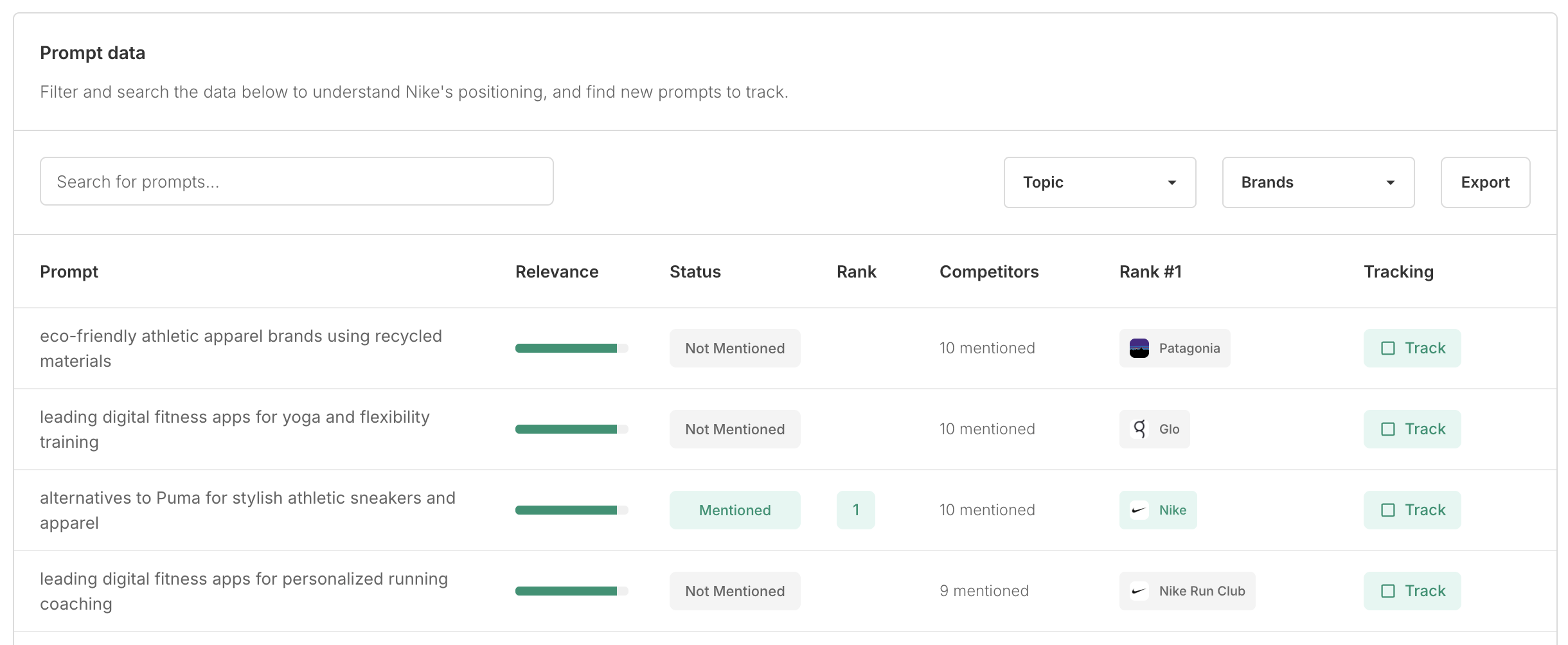
The Prompt Data section lets you explore individual prompts and their performance. You can search, filter, and export the data to find the most valuable prompts for your tracking strategy.Search and Filter Options
Search for prompts Use the search bar to find specific queries by keyword. For example, search for “enterprise” to find all prompts related to enterprise solutions. Filter by topic Prompts are automatically categorized by topic (e.g., features, use cases, audience segments). Filter by topic to focus on specific areas of your business. Filter by brand See prompts where specific competitors are mentioned. This helps you understand where competitors are gaining visibility and identify competitive gaps. Export to CSV Download the complete dataset for deeper analysis, reporting, or sharing with your team. The export includes all columns and metrics.Understanding Table Columns
The prompt data table shows several key pieces of information for each prompt:| Column | Description |
|---|---|
| Prompt | The actual query text that was sent to AI models. Click on any prompt to see detailed results including which competitors appeared and their rankings. |
| Relevance | A visual indicator showing how relevant this prompt is to your brand and industry. Higher relevance scores indicate prompts that are more central to your business and should be prioritized for tracking. |
| Status | Shows whether your brand was mentioned in responses to this prompt: Mentioned (your brand appeared) or Not Mentioned (no AI models included your brand). |
| Rank | When your status is “Mentioned,” this column shows your ranking position. The rank represents your average or most common position across AI models that mentioned you. |
| Competitors | Shows how many other brands were mentioned alongside yours (e.g., “10 mentioned”). Click this number to see the full list of competitors and their rankings for this prompt. |
| Rank #1 | Displays which brand ranked first most frequently for this prompt. This helps you identify market leaders for specific queries and understand competitive dynamics. |
| Tracking | Click the “Track” button to add this prompt to your daily tracking. The prompt will be included in your next daily report and tracked over time going forward. |
Analyzing Individual Prompts
Viewing Detailed Results
Click on any prompt text or competitor count to open a detailed view showing a full list of competitors mentioned for that prompt.
Identifying High-Value Prompts to Track
Not all prompts are created equal. Focus on these types when deciding what to add to your daily tracking: Strong performance prompts- Status: Mentioned
- Rank: 1-3
- High relevance score
- Status: Mentioned
- Rank: 4-8
- High relevance score
- Strong competitors ranked highly
- Your brand mentioned but lower ranked
- High relevance to your target market
- Status: Not Mentioned
- High relevance score
- Multiple competitors mentioned
Adding Prompts to Daily Tracking
1
Analyze performance
Review the prompt data to identify which prompts align with your tracking goals
2
Click Track button
For each prompt you want to monitor, click the “Track” button in the rightmost column
3
Confirm selection
The prompt is immediately added to your active tracking and will appear in your next daily report
4
Monitor over time
Check your dashboard and reports to see how your performance changes for these prompts
New prompts added from Prompt Research will first appear in your next daily report, typically generated overnight.
Strategic Use Cases
Building Your Initial Prompt Set
If you’re new to Trakkr or starting fresh with prompts, use Prompt Research to:- Identify 10-15 prompts where you already rank well (maintain strengths)
- Add 5-10 prompts where competitors dominate (track competitive threats)
- Include 5-10 prompts where you’re not mentioned but should be (growth opportunities)
Expanding Coverage
For existing Trakkr users, Prompt Research helps you find new topic areas or audience segments you’re not currently tracking, discover trending queries or emerging categories in your industry, identify seasonal or contextual prompts relevant to specific campaigns, and fill gaps in your prompt coverage.Competitive Analysis
Use Prompt Research to understand which competitors appear most frequently across all prompts, identify niche players or emerging competitors you weren’t tracking, see which queries competitors dominate and why, and benchmark your mention rate against the competitive landscape.Content Strategy Insights
Prompt Research reveals what questions people ask about your industry, how AI models categorize and describe your market, which features, benefits, and use cases are most associated with your category, and language and terminology patterns in AI responses.Best Practices
Don’t track everything Focus on 20-30 high-value prompts rather than trying to track all 500+. Quality over quantity ensures you can act on the data. Balance prompt types Include a mix of prompts where you’re strong, prompts where you’re competitive, and prompts where you have growth opportunities. Consider relevance scores Prioritize highly relevant prompts that align with your target market and business goals. Review competitor patterns If the same competitors appear across many prompts, they’re your true competitive set. Focus on prompts where they’re mentioned. Re-run periodically Run Prompt Research every 3-6 months to discover new prompts, emerging trends, and changing competitive dynamics. Export for analysis Use the CSV export to analyze patterns, share insights with stakeholders, or track changes between research runs.Understanding Relevance Scoring
Relevance scores help you prioritize which prompts matter most to your brand. We calculate relevance based on:- How closely the prompt aligns with your industry and product category
- Whether the prompt targets your typical customer segments
- How specific or broad the query is relative to your positioning
- Historical performance of similar prompts in your tracking
Working with Prompts
Learn how to write effective prompts and manage your daily tracking
Understanding Scores
Deep dive into how we calculate visibility and presence metrics
Reading Reports
Interpret your daily reports and track performance trends over time